
This second part of the email forensics analysis is dedicated to identifying forgery in the email header and detailing useful information from the email body.
The scope is limited to email received from external sources that mail servers do not discard — meaning emails that do not fail any security checks on the path to their destination/recipient.
If you have not seen our previous installment on how to analyze suspicious email headers, we recommend you visit it at the following link: xxxxxxxxx
The Headers
Email headers contain information about the route the email traveled (green) and the sender information (blue). While differences in the route taken and the Return-Path are penalized by rejecting the email, the From header in particular can contain misleading content.
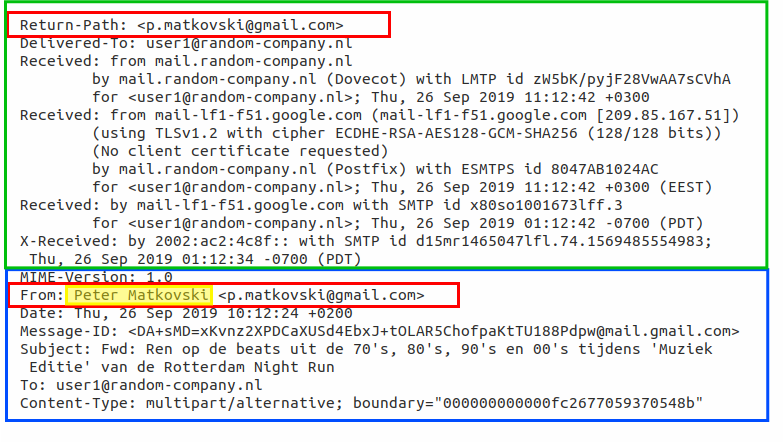
The Return-Path field is verified by the Sender Policy Framework (SPF Record) and the typical server configuration requires alignment between the Return-Path and From fields of the email. The highlighted portion represents the sender's display name and is not verified by design.
Spoofing the Sender Name: The Old Reliable
The email sender's display name offers the simplest spoofing opportunity, as it is visible to the recipient and its content is not verified. The victim may notice differences between the sender name and the address, but the email will not be flagged as suspicious or moved to spam based on this alone.
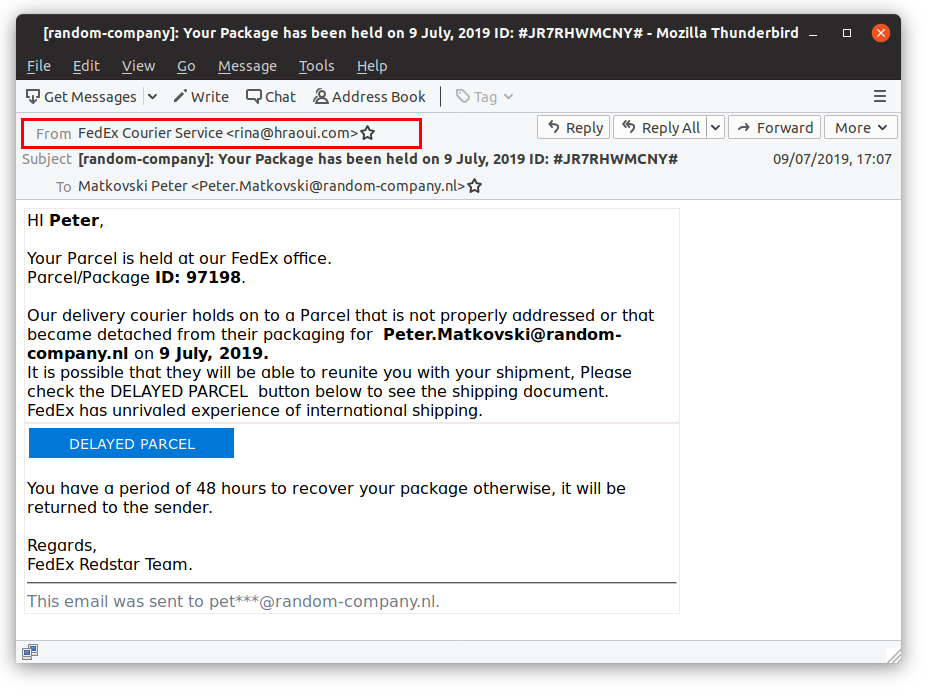
We can verify this by comparing the values at the end of the Received header with the domain's DNS record:
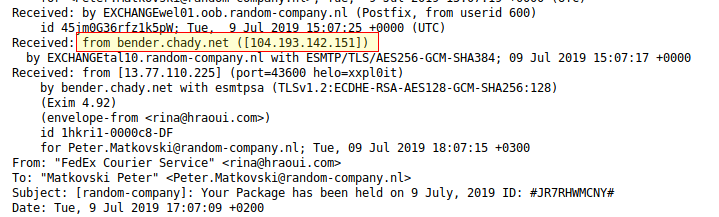
> dig +noall +answer hraoui[.]com txt<br>hraoui.com. 14400 IN TXT "v=spf1 ip4:<strong>104[.]193[.]142[.]151</strong> ...
The email was sent from the authorized server. We can assume that the server, or simply the email account, was compromised for this purpose.
Sender Header Forgery – Flagged as Spam
A sender's email address is written in two different header entries: a Return-Path header and a From header. The From value is displayed to the user, while the Return-Path is delivered to the server.
The following example shows an email that passed SPF checks despite clearly having a forged From field. The reason is that SPF is verified based on the Return-Path field.
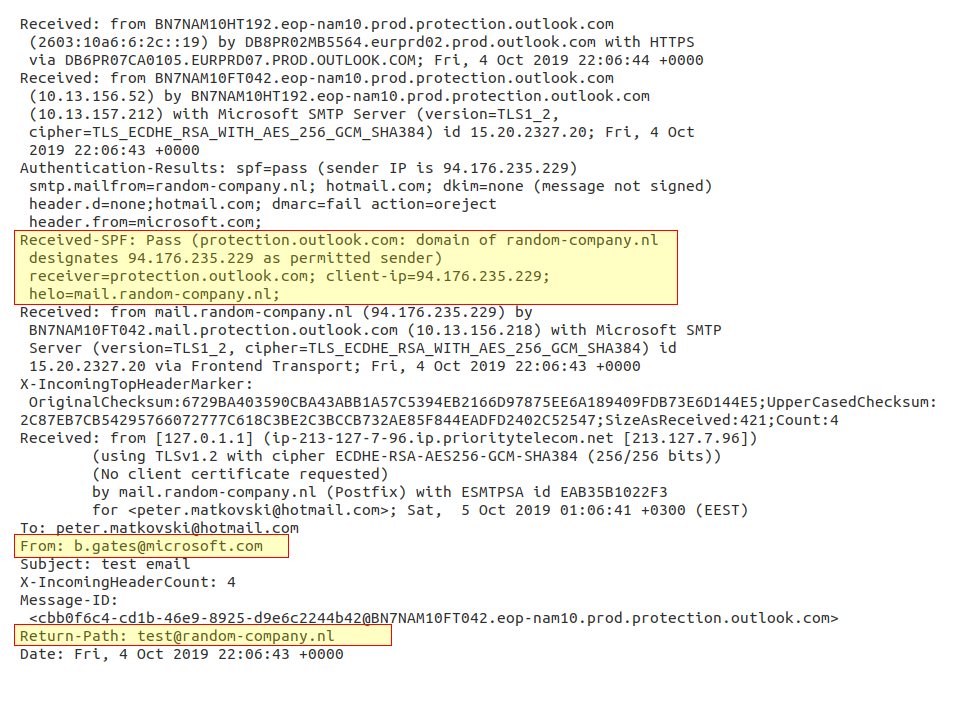
SPF passed because Return-Path matches the sender's domain
SPF fails when spoofing the Return-Path' field:
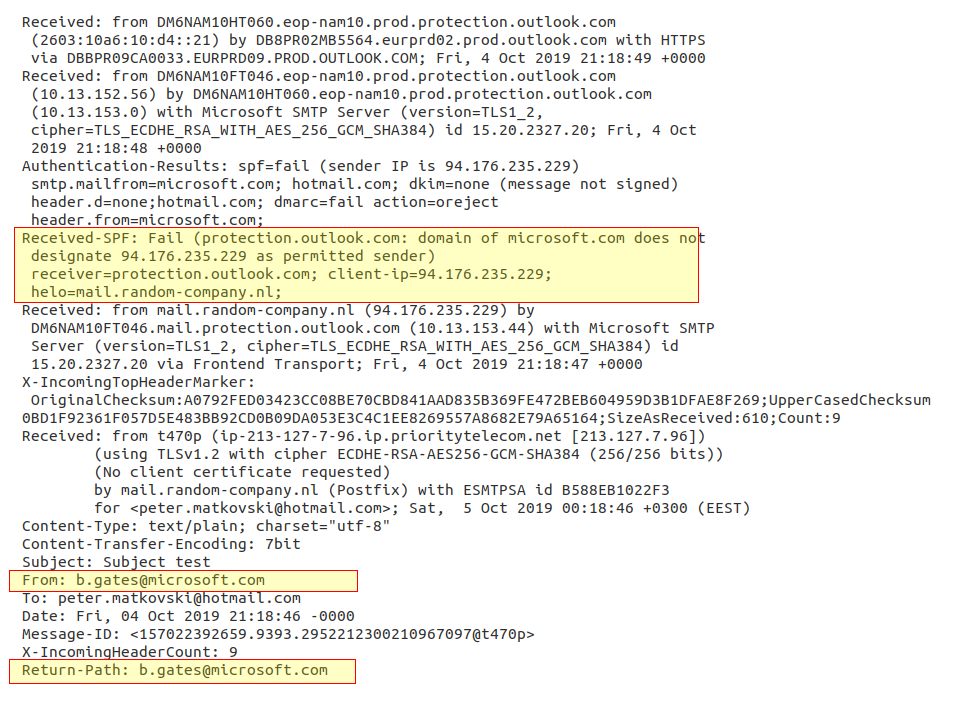
SPF failed because the Return-Path field was also forged
Domain spoofing without an MX record.
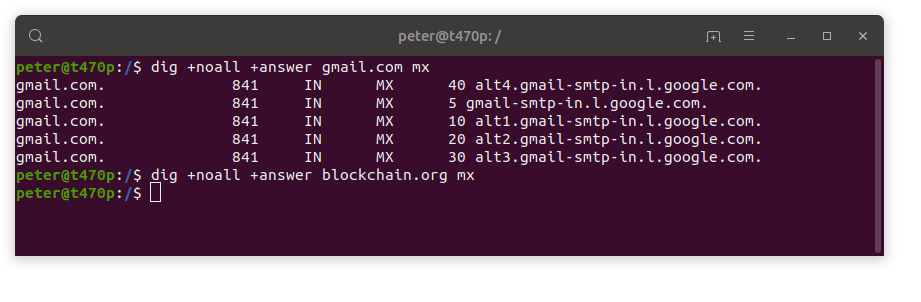
The domain blockchain [.] org has no MX record
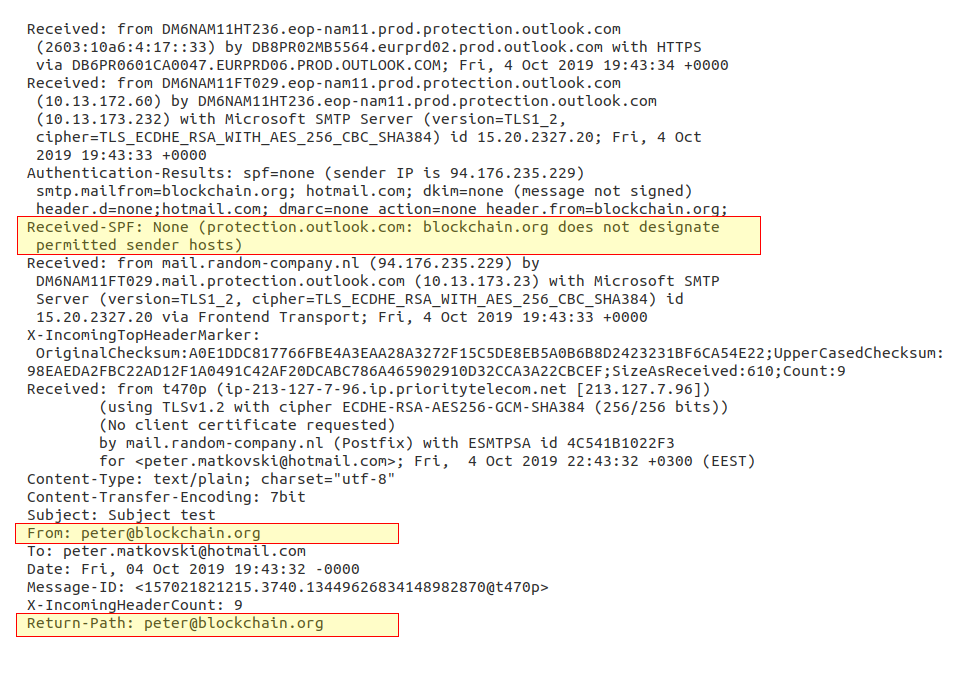
SPF None on the spoofed domain with no MX record
All of the above spoofing attempts were moved to the spam folder by the mail server.
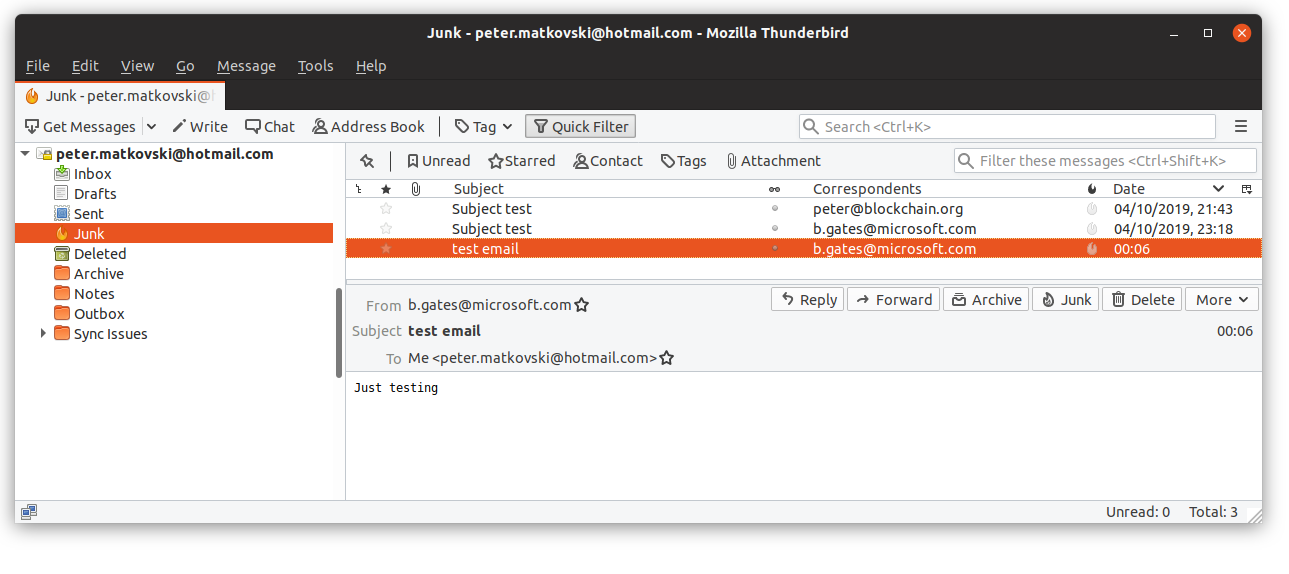
The verification result is available in the "Authentication-Results" header. If an entry is unavailable or authorization fails, this should not be taken directly as proof of spoofing. A significant number of legitimate senders do not have proper SPF and DKIM configured. The DKIM signature can fail when the SMTP server is used as a legitimate relay.
Non-Spoofed Emails
Spoofing typically reduces email reputation and may result in the message landing in a spam folder or quarantine, but this is not always the case. When an email is sent from an authorized server and signed with a valid DKIM signature, its reputation remains intact.
To take advantage of properly signed email, the following channels are most commonly used:
- Free email services (outlook.com, yahoo.com, gmail.com, …)
- Compromised email addresses (banks, ISPs, …). You can check whether you have been compromised at https://haveibeenpwned.com/
- Lookalike domains (sforce.com, worksday.com, firmadigitalcr.com, …)
- Bulk email services (MailChimp.com, SendGrid.net, …)
The Body
An important step in email classification is previewing the email, reading the text and graphics to assess the purpose of the message. For example, two widespread lures are commonly used to try to get potential victims to click on a destination link:
- An alarming message claiming some problem with the recipient's account, where they are asked to follow a link to resolve the issue, and
- A message notifying the recipient of a new/updated/shared document
92.7% of analyzed incidents used generic messages — messages that could be deployed across a large number of organizations with only minimal changes (source).
A preview should be generated by a real email client. While this may not matter in the case of plain-text emails, keep in mind that simple HTML→PNG conversion libraries will produce results very different from what an email client's rendering engine would display.
The Mozilla Thunderbird email client in a secure Docker container is a recommended practice. Short-lived containers configured solely to run Thunderbird instances should be sufficiently safe, as a full exploit chain would be required to escape the environment.
Hyperlinks
Hyperlinks within the body are the popular method for delivering a payload to victims. The presence of a suspicious, unrelated domain in a hyperlink could indicate intent to deceive the victim. Links to malicious payloads or phishing pages offer multiple advantages for the attacker:
- The hyperlink can contain parameters that identify the victim. Therefore, in the case of a successful hit or a defensive reaction, the attacker knew which recipient triggered the reaction.
- The attacker can serve different payload types to different user agents or geographic locations.
The following categories of malicious links are the most common:
- Cloud storage (Gdrive, box.com, …). Legitimate services are used to serve payloads.
- Compromised sites or servers are abused to host and deliver payloads.
- Search engines and translation services are used to fool URL analyzers that only validate domains.
- Bulk mailing services and tracking links (sendgrid.net). Bulk mail services are also being used to deliver phishing email, and some are leveraged for more granular victim tracking.
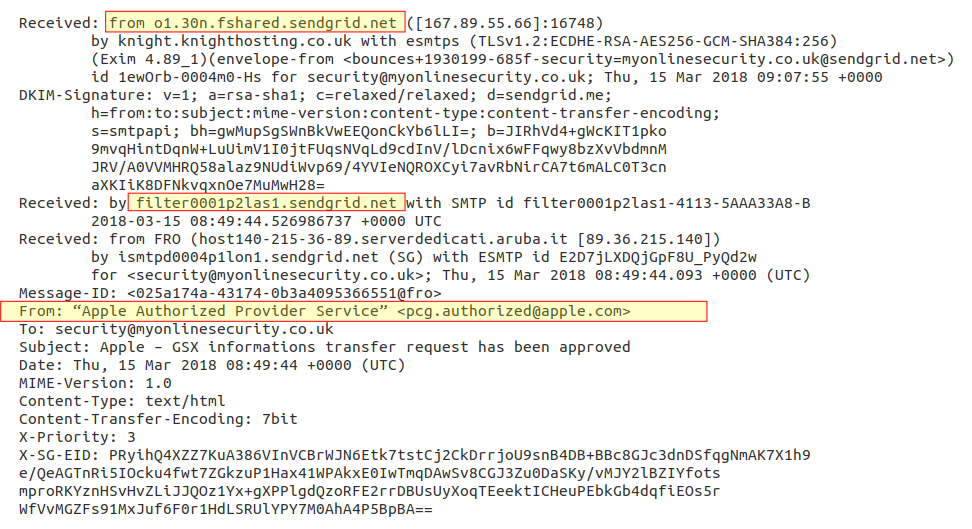
Spoofed sender with DKIM signed
Trackers
Malicious trackers share some similarities with malicious links, such as an identifier in the parameter. The goal is to identify the tracked entity in order to evaluate the effectiveness of the campaign. The tracker can be any remote resource that contains a unique identifier when requested — typically a 1×1 pixel loaded from a remote server.
Conclusions
A simple header validation is not always sufficient; it is also important to analyze each field in detail. It is likewise worth keeping in mind that the Received and X- fields created by your own mail services are the only fully trustworthy entries.
It is also important to be patient and carefully analyze the information delivered as part of an investigation, organizing and classifying it properly so that it can be understood by the client when this type of service is provided.
Leave a Comment
Comments are reviewed before publishing.