Sometimes we need to look for open ports on a machine or host for our work or for security purposes. Most of the time we use Nmap or any other port scanner for this job.
But sometimes all we need is a simple port scanner, not a complicated one. So in this article, we are going to build our own port scanner with Python.
Let's build one
Port Scanner is based on Python 3 and uses some additional libraries such as and (For Banner).[socket](http://geeksforgeeks.org/socket-programming-python/)``pyfiglet
import pyfiglet
import sys
import socket
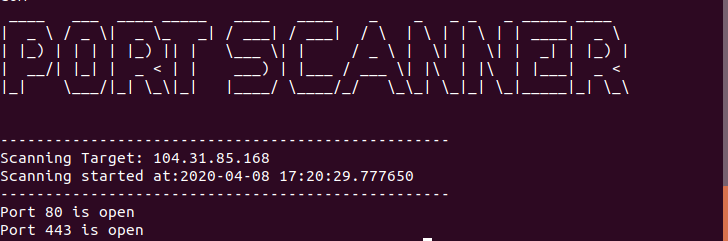
from datetime import datetimeascii_banner = pyfiglet.figlet_format("PORT SCANNER")
print(ascii_banner)# Defining a target
if len(sys.argv) == 2:
Resuelve el hostname a IPv4
target = socket.gethostbyname(sys.argv[1])
else:
print("Invalid ammount of Argument")# Add Banner
print("-" * 50)
print("Scanning Target: " + target)
print("Scanning started at:" + str(datetime.now()))
print("-" * 50)try:
Realiza el escaneo de los puertos 1 al 65,535
for port in range(1,65535):
s = socket.socket(socket.AF_INET, socket.SOCK_STREAM)
socket.setdefaulttimeout(1)
Indica si hay algun error
result = s.connect_ex((target,port))
if result ==0:
print("Port {} is open".format(port))
s.close()
except KeyboardInterrupt:
print("\n Exitting Program !!!!")
sys.exit()
except socket.gaierror:
print("\n Hostname Could Not Be Resolved !!!!")
sys.exit()
except socket.error:
print("\ Server not responding !!!!")
sys.exit()
Leave a Comment
Comments are reviewed before publishing.