
A cybercriminal group is deploying a phishing campaign that employs a fraudulent website to harvest Microsoft Office 365 credentials by creating HTML code fragments stored both locally and remotely. This method involves integrating various pieces of HTML hidden inside JavaScript files to render the fake login interface where the victim submits their confidential information.
Potential victims receive an attachment disguised as an Excel document that is actually an HTML file containing a URL-encoded text fragment. A report by Trustwave researchers notes that decoding this text reveals additional encoded content.
Further analysis uncovered links to two JavaScript files hosted on "yourjavascript.com", which has recently been associated with other phishing campaigns.
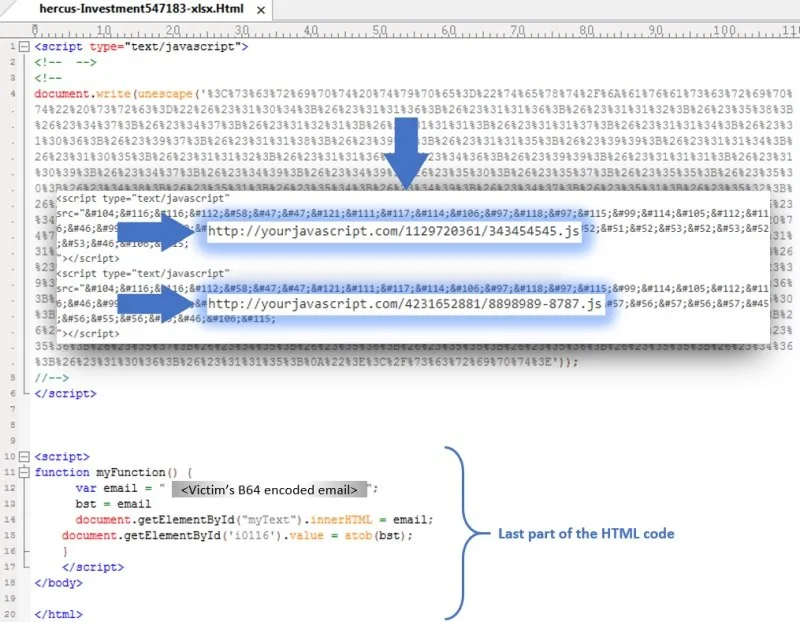
These JavaScript files contained two blocks of encoded text to conceal the HTML code, the URL, and the Base64 encoding. One of these files contains a section of the phishing website along with code to validate the victim's email address and password. The second JavaScript file, meanwhile, contains the "submit" function — located through the form — and code to trigger a pop-up message informing victims that their connection had failed and they needed to authenticate again.
Trustwave experts decoded nearly 400 lines of HTML code, grouped into five fragments across the two JavaScript files and one in the attachment sent to the victim, which assembled into the Office 365 phishing website much like pieces of a puzzle.
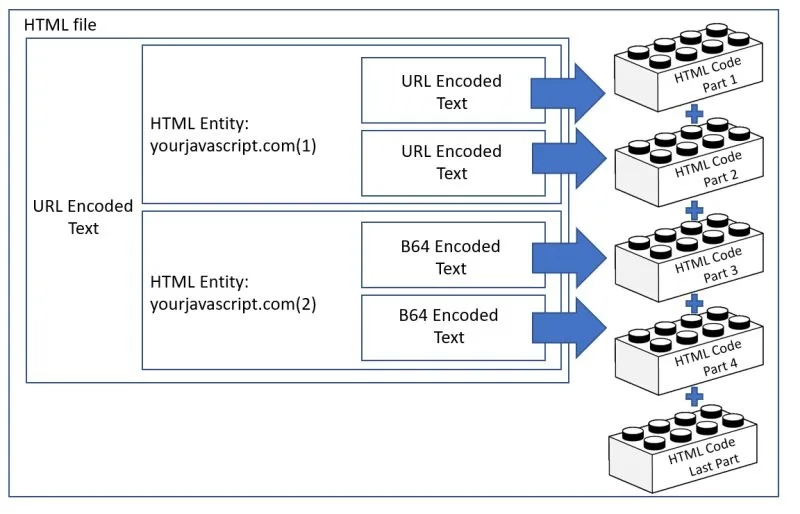
Specialists note that the most unusual aspect of this campaign is that the malicious code is downloaded in hidden fragments from a remote location and then assembled locally: "This allows threat actors to bypass protection mechanisms such as Secure Email Gateways."
Finally, Trustwave notes that the URL receiving the stolen credentials in this campaign remains active, making it essential for Office 365 account administrators to stay aware of these security risks — ignoring any email sent by unknown users and avoiding visits to potentially malicious websites.
To learn more about computer security risks, malware, vulnerabilities, and information technology, visit the website of the International Institute of Cyber Security (IICS).
Source: NoticiasCiberseguridad
Leave a Comment
Comments are reviewed before publishing.