Email is an indispensable communication tool. We use it every day. Unfortunately, many attacks also originate from emails, such as phishing. Wouldn't it be great if everyone had some forensic skills to analyze emails? Don't worry — by the end of this article, you should feel quite confident in your email analysis abilities.
An alert, trained, and security-aware user is a critical layer of defense against threats, both internal and external. Even if malicious URLs and emails bypass spam filters and antivirus software, a human user can detect them. This defensive strategy is common in secure system designs. It also demonstrates a first principle of cybersecurity called layered security.
Layered security strategy: uses multiple layers of defense or information protection. If one layer is defeated, the next layer should protect the information. The most fragile layer is the human layer; we must detect problems (such as phishing) that bypass filtering mechanisms at the email and browser level.
When reading emails, the first element that catches our attention is the sender's name, email address, and subject. But it may come as a surprise that spoofing these in an email is actually quite easy. It is also effective at deceiving unsuspecting email users. Take a look at some of the statistics in Verizon's data breach reports:

How long does an attacker have to wait to get that foot in the door? We aggregated results from more than 150,000 emails sent as part of approved tests by two of our security awareness partners and measured how much time had passed from when the message was sent to when the recipient opened it, and whether they were influenced to click or provide data (where the real damage occurs). The data showed that nearly 50% of users open emails and click on phishing links within the first hour. [Verizon DBIR 2014]
No improvement in 2016: 13% of people tested click on a phishing attachment; the median time to click is very short.
2017 update: "Phishing via email was the most prevalent variety of social attacks." Social attacks were used in 43% of all breaches in the 2017 dataset. Nearly all phishing attacks that led to a breach were followed by some form of malware, and 28% of phishing breaches were attacked. Phishing is the most common social tactic in the 2017 dataset (93% of social incidents).
If you're a bad actor planning a heist, phishing emails are the easiest way to introduce malware into an organization. That's why it's wise to understand exactly where an email really comes from. Don't rush to open attachments or click links in emails. Verizon DBIR states that more than 99% of malware is delivered via email or web server.
Email Headers
Email forensics is performed using data residing in the email's header. Much of this information is never shown to the user. The email client only displays a few selected pieces of data — such as accounts, IP addresses, dates, and other elements that allow an email to be validated when presented as evidence in an incident or trial.
The surprising thing is that the information actually shown to a user can be easily spoofed!
An email consists of a header and a body, presented according to the format defined by the RFC 822 standard[1]. The header data needed for forensic analysis must be identified and handled individually during the forensic investigation.
Before we begin, consider this email from President Donald Trump to a researcher at the University of Nebraska in Omaha. They have a great cybersecurity program. They recently earned the prestigious NSA CAE-CO (Cyber Operations) designation. You can read about the available degree programs in Cybersecurity here:
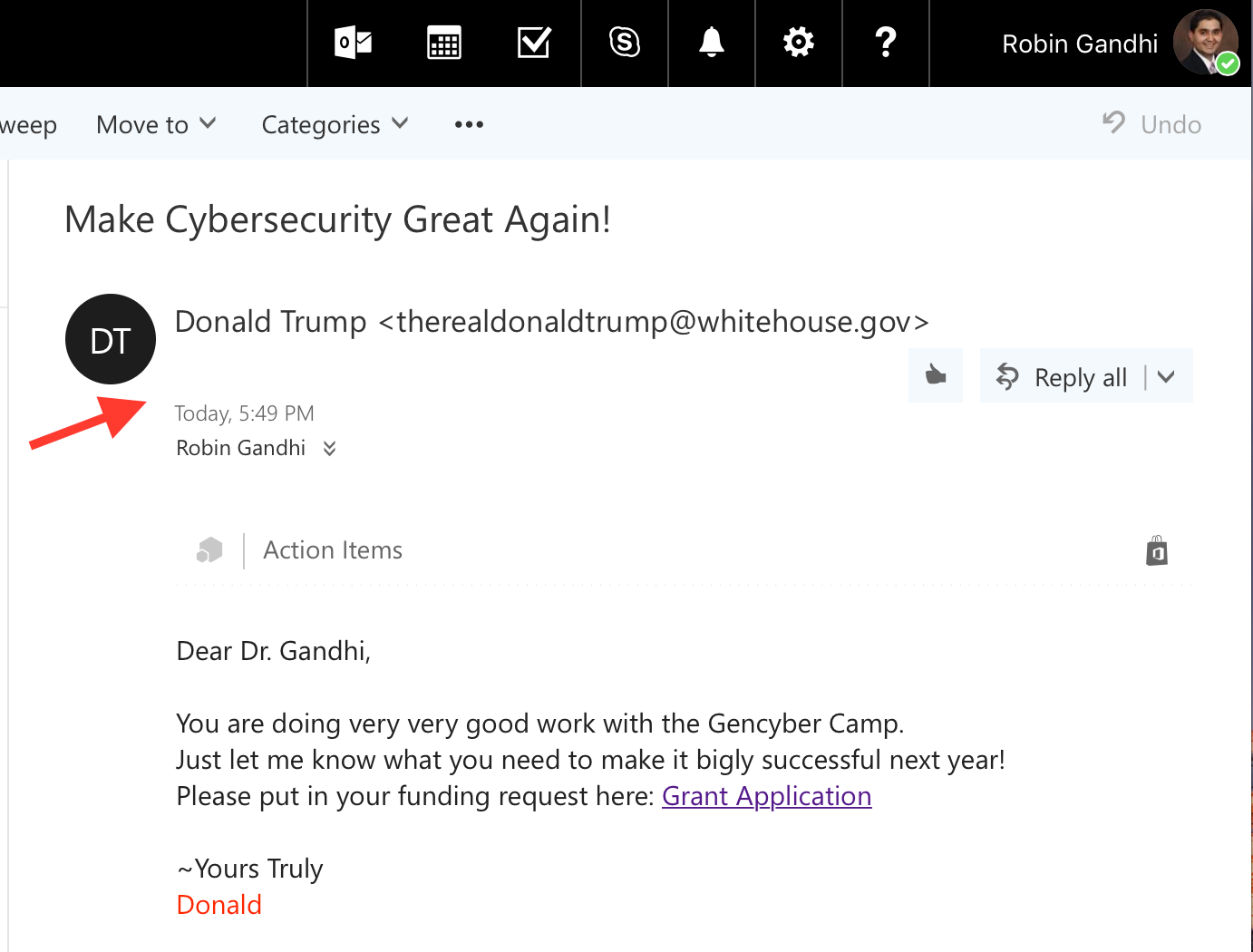
We see emails like this all the time using desktop or web-based email clients. The section pointed to by the large red arrow in the figure above is the part of the email header that most people are familiar with.
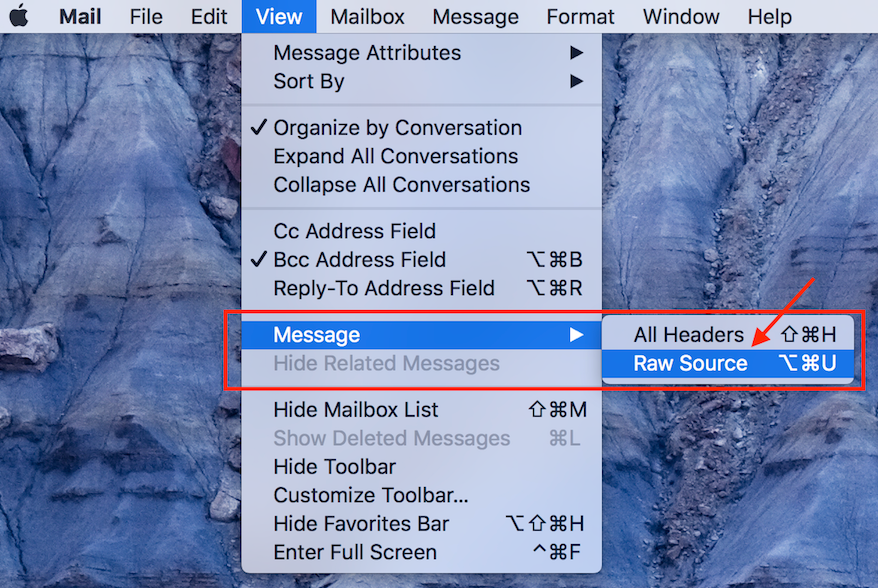
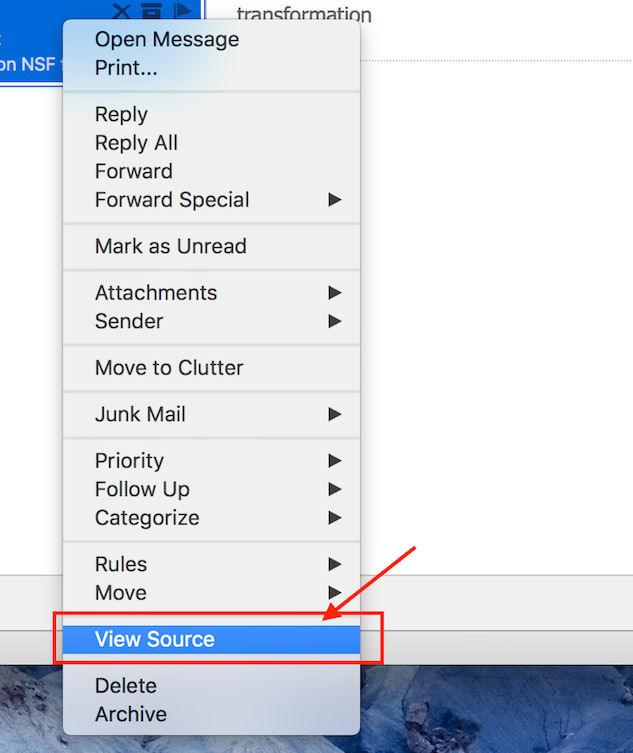
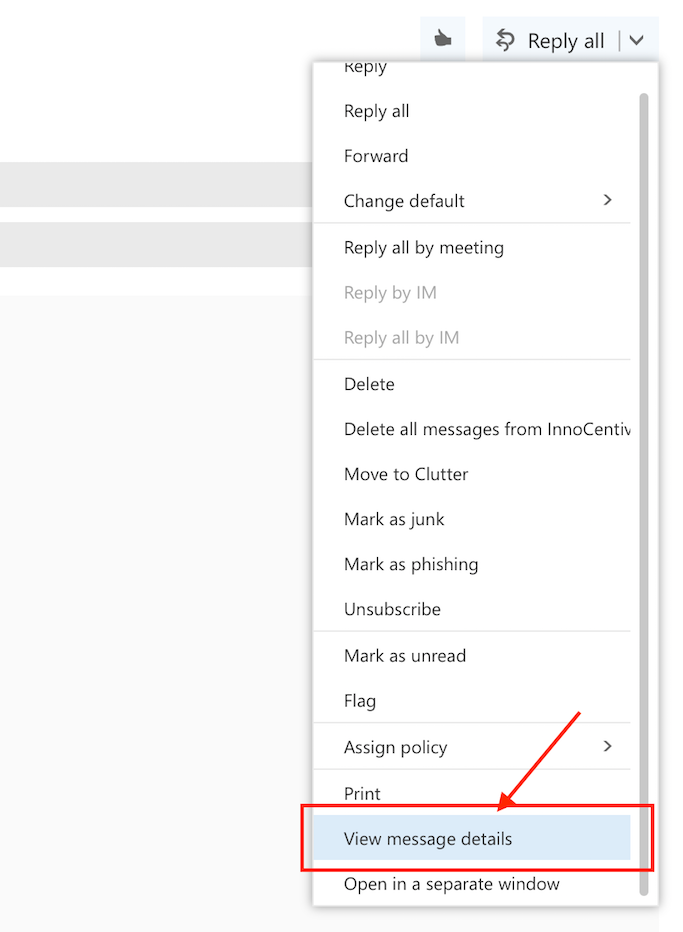
There is more to this header. To reveal the full message header, different desktop or web email applications have different methods. Here are instructions for obtaining full email headers using popular email applications:
Apple Mail
Outlook Desktop Client
Outlook Web Client
Gmail
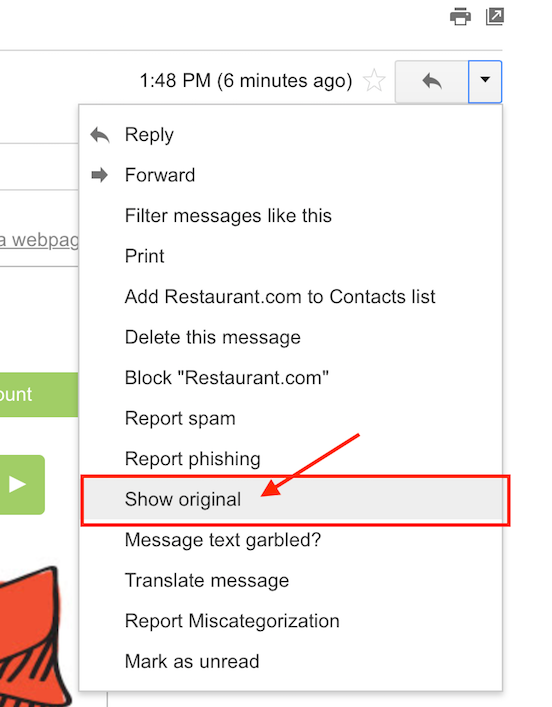
It is obvious that, in all cases, it is difficult to find full email headers if you don't know where to look.
Once you find them, there is a wealth of information in the header about the path taken by an email. Let's look at some real email headers. Open the file encabezado-correo-1.txt
Received: from BL2PRD0711HT001.namprd07.prod.outlook.com (10.255.104.164) by
 BY2PRD0711HT003.namprd07.prod.outlook.com (10.255.88.166) with Microsoft SMTP
 Server (TLS) id 14.16.257.4; Thu, 17 Jan 2013 23:35:35 +0000
Received: from BL2PRD0711HT002.namprd07.prod.outlook.com (10.255.104.165) by
 BL2PRD0711HT001.namprd07.prod.outlook.com (10.255.104.164) with Microsoft
 SMTP Server (TLS) id 14.16.257.4; Thu, 17 Jan 2013 23:35:34 +0000
Received: from mail240-tx2-R.bigfish.com (65.55.88.116) by
 BL2PRD0711HT002.namprd07.prod.outlook.com (10.255.104.165) with Microsoft
 SMTP Server (TLS) id 14.16.257.4; Thu, 17 Jan 2013 23:35:34 +0000
Received: from mail240-tx2 (localhost [127.0.0.1]) by mail240-tx2-R.bigfish.com (Postfix) with ESMTP id A05C032025F for <[email protected]>; Thu, 17 Jan 2013 23:35:33 +0000 (UTC)
X-Forefront-Antispam-Report: CIP:59.125.100.113;KIP:(null);UIP:(null);IPV:NLI;H:bf.shako.com.tw;RD:59-125-100-113.HINET-IP.hinet.net;EFVD:NLI
X-BigFish: ps73(zz7f52hd926hzz1ee6h1de0h1ce5h1202h1e76h1d1ah1d2ahz58hz8275bhz2ei2a8h668h839h940h10d2h1177h1288h12a5h12a9h12bdh137ah139eh13b6h13eah1441h1537h162dh1631h1758h17f1h184fh1898h300k503k953iwa7jk)
X-FOSE-spam: This message appears to be spam.
X-SpamScore: 73
Received-SPF: neutral (mail240-tx2: 59.125.100.113 is neither permitted nor denied by domain of aol.com) client-ip=59.125.100.113; [email protected]; helo=bf.shako.com.tw ;shako.com.tw ;
Received: from mail240-tx2 (localhost.localdomain [127.0.0.1]) by mail240-tx2
 (MessageSwitch) id 1358465731454940_30539; Thu, 17 Jan 2013 23:35:31 +0000
 (UTC)
Received: from TX2EHSMHS007.bigfish.com (unknown [10.9.14.242]) by mail240-tx2.bigfish.com (Postfix) with ESMTP id 675424200E7 for <[email protected]>; Thu, 17 Jan 2013 23:35:31 +0000 (UTC)
Received: from bf.shako.com.tw (59.125.100.113) by TX2EHSMHS007.bigfish.com
 (10.9.99.107) with Microsoft SMTP Server (TLS) id 14.1.225.23; Thu, 17 Jan
 2013 23:35:28 +0000
Received: from mail.shako.com.tw (59-125-100-112.HINET-IP.hinet.net
 [59.125.100.112]) by bf.shako.com.tw (8.14.3/8.14.3) with ESMTP id
 r0HNYCgA013928; Fri, 18 Jan 2013 07:34:12 +0800
X-Authentication-Warning: bf.shako.com.tw: Host 59-125-100-112.HINET-IP.hinet.net [59.125.100.112] claimed to be mail.shako.com.tw
Authenticated-By: nobody
X-SpamFilter-By: BOX Solutions SpamTrap 3.5 with qID r0HNXZSI028539, This message is passed by code: ctdos35128
Received: from User (85-250-54-29.bb.netvision.net.il[85.250.54.29])
(authenticated bits=0)
by mail.shako.com.tw (8.14.3/8.14.3/4.90) with ESMTP
 id r0HNXZSI028539; Fri, 18 Jan 2013 07:33:38 +0800
X-BOX-Message-Id: r0HNXZSI028539
Message-ID: <[email protected]>
X-Authentication-Warning: mail.shako.com.tw: Host 85-250-54-29.bb.netvision.net.il[85.250.54.29] claimed to be User
Reply-To: <[email protected]>
From: JOSEPH CAMARAH VIEIRA <[email protected]>
Subject: [Spam-Mail] Dear Sir/Madam. (This message should be blocked: ctdos35128)
Date: Fri, 18 Jan 2013 01:46:07 +0200
Content-Type: text/plain; charset="Windows-1251"
Content-Transfer-Encoding: 7bit
X-Mailer: Microsoft Outlook Express 6.00.2600.0000
X-MimeOLE: Produced By Microsoft MimeOLE V6.00.2600.0000
To: Undisclosed recipients:;
Return-Path: [email protected]
X-MS-Exchange-Organization-SCL: 7
X-MS-Exchange-Organization-AVStamp-Mailbox: MSFTFF;1;0;0 0 0
X-MS-Exchange-Organization-AuthSource: BL2PRD0711HT002.namprd07.prod.outlook.com
X-MS-Exchange-Organization-AuthAs: Anonymous
MIME-Version: 1.0

Dear Sir/Madam,
My name is Joseph Camarah Vieira, I am from Guinea Bissau, my late father was the former Minister of Mines in my country Guinea Bissau, he was killed by rebels in my country, before his death he deposited $60 million dollars with Global Trust Security Company Accra Ghana, I want you to help me receive this money in your country to invest in your country. I will give you 30% of the total sum when the funds arrive in your country.

Regards.
Mr. Joseph Camarah Vieira
00233 244617 863
my email: [email protected]
Headers Are Like Passports
Picture a Turkish citizen traveling from the USA to China with layovers in Germany and India. The authorities in each country at each leg of the journey would record the origin and destination of the previous stop in the passport. Assuming the traveler has appropriate visas for all countries visited, one way to describe the journey in their passport might look like this, with the most recent entry at the top:
Passenger-Received: from India by China     # Chinese Authority
Passenger-Received: from Germany by India   # Indian Authority
Passenger-Received: from USA by Germany     # German Authority
The header is like a passport for your email. The header receives an entry at each stop along the way from the email server it encounters. As a result, the more servers the email is routed through, the longer the header will be.
Now, if you look at the file encabezado-correo-1.txt, there appear to be many Received: entries:
So where in this file should we start tracing the origin of the email and the stops it took to reach the final destination?
Here is information that will help us do this. As an email travels from origin to destination, each server adds its header entries at the top of the email body. So if we want to trace the origin of the email, this will be the first Received: entry found starting from the bottom of the email. If you see something like Received-SPF:, ignore it.
Reading Email Headers
There are a few other fields you should investigate in the email header.
Return-path: check whether the email address in this entry matches the email address in the From: entry. They usually won't match for those sending bulk emails such as advertisers or spammers. Delivery problem notices are sent to this address and it is validated by SPF Records.
Reply-To: Check whether the email address matches the email address in the From: entry. When you press reply on an email, the Reply-To: entry is used to populate the recipient's email. If it is different, you may accidentally send your reply to someone else. It overrides the From: value in the reply.
Received: A single email will often have multiple "Received" entries. The bottom "Received" entry will show the first server to handle the mail message.
Bcc: or X-UIDL: This is a sign of a poorly crafted header. They are never present in normal emails!
Lines beginning with X-: Additional data not contained under any standard. Added by email servers and security tools. It is advisable to pay attention to the X-Distribution field (indicates spam mail) and X-Mailer (email client).
X-Spam score, X-Spam flag, and X-Spam status help determine "spamminess" (the degree of spam in an email header). But scores are not standardized across servers, so they must be examined on a case-by-case basis.
The Received and X- fields created by your own email services are the only fully trustworthy entries.
Emails are susceptible to Email Spoofing, an attempt to impersonate the email header in order to deceive people reading the headers. You can read the following article to learn more about the forensic analysis of these.
Part 2 in development
Forensic Analysis of Spoofed Headers: Email Spoofing in Phishing
Exercise
For the file encabezado-correo-1.txt, start scanning from the bottom of the header toward the top and examine the first Received: entry. It will look like this:
Received: from User (85-250-54-29.bb.netvision.net.il[85.250.54.29])
(authenticated bits=0)
by mail.shako.com.tw (8.14.3/8.14.3/4.90) with ESMTP
 id r0HNXZSI028539; Fri, 18 Jan 2013 07:33:38 +0800
The first server to receive the email from the sender's computer creates this entry. If the email client is web-based, this entry will include details about the server hosting the web email application.
Let's analyze this entry further. The from part indicates the source of the email for this leg of the journey: User (85-250-54-29.bb.netvision.net.il [85.250.54.29]). You can identify a domain name (85-250-54-29.bb.netvision.net.il) and an IP address (85.250.54.29).
The by part indicates the first stop made after the email's origin: mail.shako.com.tw (8.14.3 / 8.14.3 / 4.90). You can identify a name: mail.shako.com.tw.
The first email server encountered adds this header entry and all other entries below it. There is a high probability that a malicious sender has full control over this email server. So do not trust this information. Regardless, we now have information to conduct a deeper investigation. Let's try to find out the geographic location of the email server.
We can use an online utility such as https://network-tools.com and enter the domain name or IP address as a query. Here we use 85-250-54-29.bb.netvision.net.il and mail.shako.com.tw as queries.
SEARCH RESULTS: 85-250-54-29.bb.netvision.net.il

85.250.54.29 is from Israel (IL) in region Middle East
Input: 85-250-54-29.bb.netvision.net.il
canonical name: 85-250-54-29.bb.netvision.net.il
Registered Domain: netvision.net.il

person: Liora Barak
address Netvision Ltd
address Omega Center , Matam
address Haifa
address 31905
address Israel

SEARCH RESULTS: mail.shako.com.tw

202.39.131.130 is from Taiwan (TW) in region Southern and Eastern Asia
Input: mail.shako.com.tw
canonical name: mail.shako.com.tw
Registered Domain: shako.com.tw
The searches reveal that a computer in Israel used an email server in Taiwan as the first stop on its way to the USA, while the actual body of the email claims the sender is from Guinea Bissau.
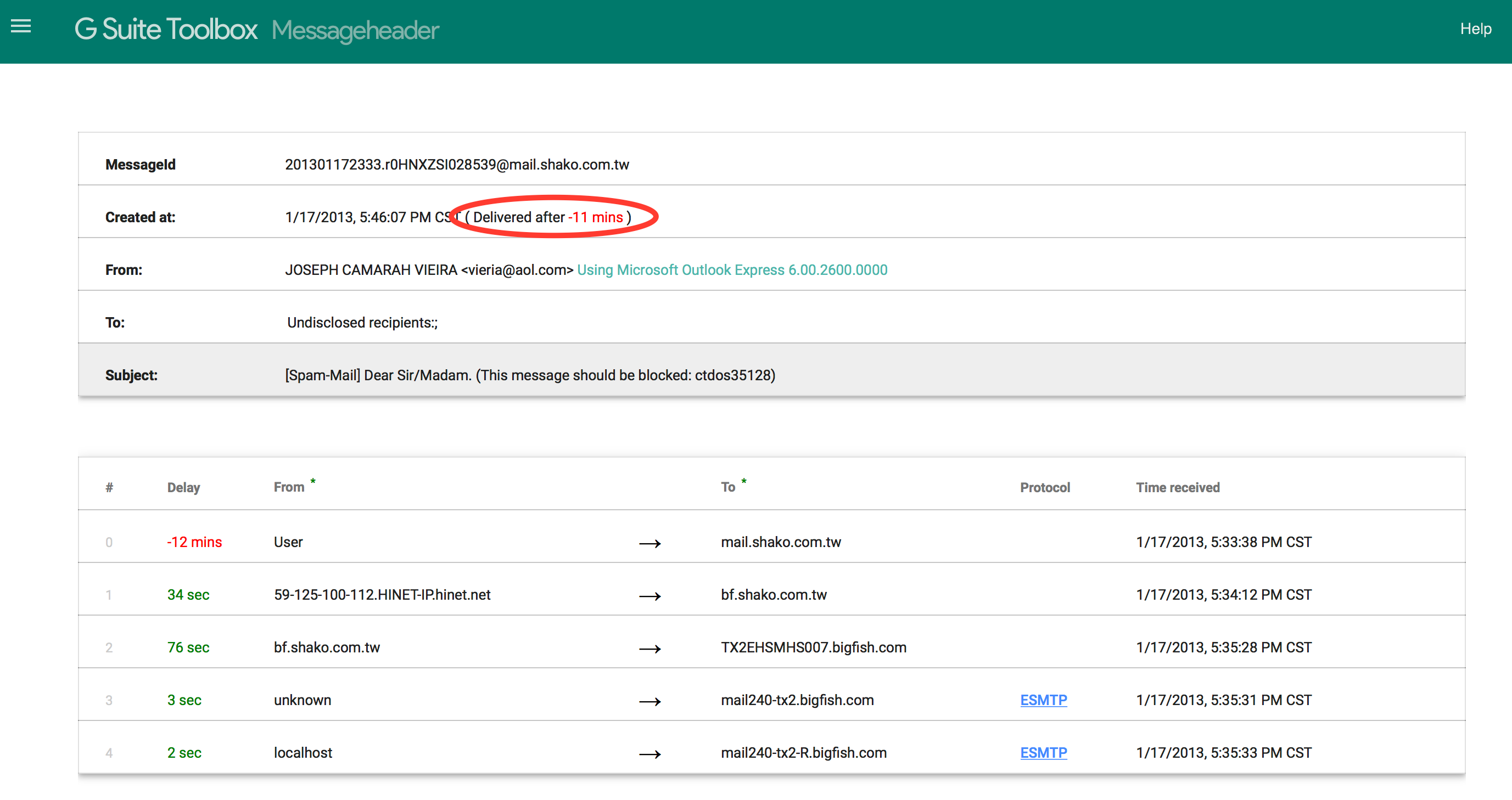
Google has a tool that helps examine the "hops" and the wait time between them. Large delays in the acceptance of email by the first server can be a sign of overloaded, resource-limited spam servers. This is what the tool shows about the file encabezado-correo-1.txt. There is a suspicious 12-minute delay right at the beginning, which may indicate an overloaded spam-sending email server. Sometimes, the time difference between servers can cause false positives.
Conclusions
It is important to note that we should not trust all emails we receive — it is always good to stop and analyze whether they contain suspicious content that could harm us and our company. Also, despite reading these headers, an attacker may have compromised the mail server and modified them at will, so it is important that we also know how to read spoofed internet headers, which we will discuss in our next article: Forensic Analysis of Spoofed Headers: Email Spoofing in Phishing
As recommendations to avoid this type of threat, I would also like to suggest the following:
Stay alert. Phishing emails may try to create urgency or fear by claiming that your information has been compromised.
Watch for poor spelling. Most emails coming from abroad contain grammar and spelling errors, as they are written quickly and not proofread.
Use security solutions that protect you. You can use anti-spam solutions to protect yourself and your users. You can contact us and we will be happy to advise you on the best solution that fits your business environment.
Use your phone. If you check your email from a mobile device, it may be harder to detect this type of email. The small screen makes it more complicated due to responsiveness.
Use common sense. Think before you click — entering your email in strange contests can result in attackers getting hold of your email address and finding ways to compromise you. Never open emails from unknown senders.
Additional Reading and Tools
- How to locate raw headers in email clients. mxtoolbox
- Advanced header analysis. ARCLAB
- DomainKeys Identified Mail (DKIM), https://en.wikipedia.org/wiki/DomainKeys_Identified_Mail
- Sender Policy Framework (SPF), www.open-spf.org
- Various email header analysis tools: https://www.redeszone.net/2019/07/01/herramientas-online-analizar-cabecera-correo/
Leave a Comment
Comments are reviewed before publishing.